

Provide CompTIA 220-1202 Dumps Updated Aug 16, 2026 With 444 QA's
Latest 220-1202 Dumps for Success in Actual CompTIA Certified
NEW QUESTION # 24
A technician is installing a cloud-based productivity suite and keeps getting an error message stating that the installation is unavailable. Which of the following troubleshooting steps should the technician try first?
- A. Downloading an open-source alternative
- B. Reinstalling the productivity suite
- C. Updating the device OS
- D. Checking the license device limit
Answer: D
Explanation:
The technician should first check the license device limit, as exceeding the allowed number of installations can prevent the cloud-based productivity suite from being installed.
NEW QUESTION # 25
A user needs to download some files from a vendor website. Downloading the specific file type is blocked when using the Microsoft Edge web browser. A technician determines that the files the user wants to download are safe. Which of the following should the technician configure to allow these files to be downloaded?
- A. User Account Control
- B. Firewall
- C. Defender
- D. SmartScreen
Answer: D
Explanation:
Microsoft Edge most commonly blocks "unrecognized" or "potentially unsafe" downloads through Microsoft Defender SmartScreen, which is a reputation-based protection feature integrated into Windows/Edge. When SmartScreen cannot establish trust in a downloaded file (often because the file type is commonly abused or the file has low reputation), it can warn or block the download even if the technician believes the file is legitimate. In this scenario, the technician should adjust SmartScreen settings (rather than disabling antivirus, UAC, or the firewall) to permit the download while keeping other protections intact. This aligns with Windows security management concepts: Windows includes built-in protections (Microsoft Defender and related safeguards) that can be configured through Windows Security, and technicians should tune the specific protection causing the block instead of broadly weakening system security. Also, browser security options are managed from the browser's Settings area, reinforcing that the correct fix is changing the browser's download
/reputation protection behavior rather than network or privilege controls.
References: Quentin Docter - CompTIA A+ Complete Study Guide (Windows Security / Microsoft Defender configuration); Mark Soper - Mike Meyers' A+ Lab Manual (browser security settings found in browser Settings menus, including Edge)
NEW QUESTION # 26
A help desk technician recently installed an SSH client on a workstation in order to access remote servers. What does this enable?
- A. To utilize an SSO connection
- B. To encrypt and decrypt protected messages
- C. To securely establish a console session
- D. To facilitate device log reviews
Answer: C
Explanation:
SSH (Secure Shell) allows encrypted console sessions to access and administer remote servers.
NEW QUESTION # 27
After completing malware removal steps, what is the next step the technician should take?
- A. Reimage the computer
- B. Educate the end user
- C. Perform a secondary antivirus scan
- D. Review system logs
Answer: B
Explanation:
End-user education is crucial after malware removal to prevent recurrence. Teaching safe browsing habits and security awareness completes the remediation cycle.
Mark Soper - Mike Meyers ' Lab Manualstates:
"Educating the user after malware remediation is part of the CompTIA malware response methodology. This includes training on phishing and safe practices."
NEW QUESTION # 28
Multiple users are reporting audio issues as well as performance issues after downloading unauthorized software. You have been dispatched to identify and resolve any issues on the network using best practice procedures.
INSTRUCTIONS
Quarantine and configure the appropriate device(s) so that the users' audio issues are resolved using best practice procedures.
Multiple devices may be selected for quarantine.
Click on a host or server to configure services.
If at any time you would like to bring back the initial state of the simulation, please click the Reset All button.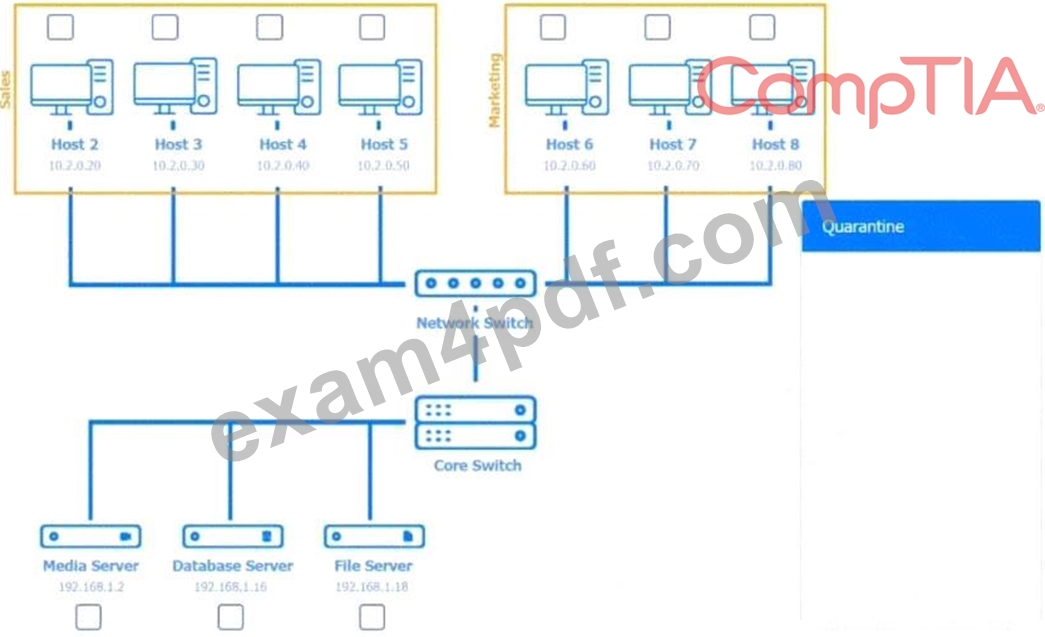










Answer:
Explanation:
See Explanation below for complete solution.
Explanation:
Host 2, Host 3, Host 4 , Host 5 ,Host 6, Host 7, Host 8 , Media Server - Stop All unwanted and malicious service (Persistance.j1zpxn Installer Service) from all the listed host and Media servers Refer screenshot below on the required service started/stopped on host2, same service to be started and stopped across all host servers.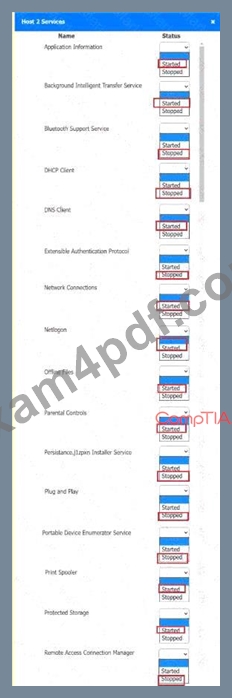
A screenshot of a computer AI-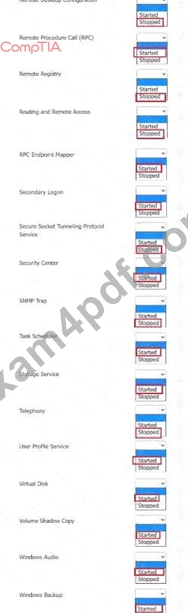
A screenshot of a computer AI-
NEW QUESTION # 29
A technician is assisting a customer who is experiencing frequent network issues. The customer asks whether other clients have experienced similar issues and how those situations were handled. Which of the following is the best way for the technician to respond?
- A. Provide a general explanation of troubleshooting steps without additional details.
- B. Dismiss the user's concern and assure them that their issue is unique.
- C. Criticize the customer's network provider and recommend a new vendor.
- D. Share details about other customer issues and how they were resolved.
Answer: A
Explanation:
Providing a general explanation of troubleshooting steps maintains professionalism and protects customer confidentiality while still addressing the user's concern.
NEW QUESTION # 30
A customer wants to format an external hard drive to work on both Windows and macOS. Which of the following filesystems is the best to use?
- A. NTFS
- B. exFAT
- C. XFS
- D. APFS
Answer: B
Explanation:
The correct answer is B. exFAT, because exFAT (Extended File Allocation Table) is designed to provide cross-platform compatibility between Windows and macOS while supporting large files and large storage devices. When an external hard drive must be readable and writable by both operating systems without additional drivers or configuration, exFAT is the preferred choice.
According to the Quentin Docter - CompTIA A+ Complete Study Guide, exFAT was developed to overcome the limitations of FAT32, such as file size and volume size restrictions, while maintaining broad operating system support. Both Windows and macOS include native support for exFAT, making it ideal for removable storage devices.
The Travis Everett & Andrew Hutz - CompTIA A+ All-in-One Exam Guide explains that NTFS is fully supported on Windows but only has limited or read-only support on macOS by default. APFS is Apple's proprietary filesystem and is not natively supported by Windows. XFS is a Linux filesystem and is incompatible with both Windows and macOS without third-party tools.
The Mike Meyers / Mark Soper Lab Manual reinforces that for external drives shared across platforms, exFAT offers the best balance of compatibility, performance, and simplicity.
Therefore, exFAT is the best filesystem choice, making B the correct answer.
NEW QUESTION # 31
A user takes an iOS-based smartphone to a repair shop due to performance issues. The technician observes:
Battery charge: 25%
Battery health: 90%
Hotspot: On
Used space: 63.76GB / 64GB
Which of the following is the most likely cause of the performance issue?
- A. The battery health is low
- B. The hotspot is degrading the performance
- C. Too many applications are open
- D. The device is running out of free space
- E. The phone is not sufficiently charged
Answer: D
Explanation:
Running atnear full storage capacitysignificantly slows down smartphones. iOS in particular requires space for caching and temporary files. Performance improves when storage is cleared.
FromMike Meyers ' Lab Manual:
"Lack of free space causes mobile operating systems to struggle with temp files and updates. Performance improves significantly with adequate storage."
NEW QUESTION # 32
After a technician upgrades the RAM on a user's workstation, the system shows a No boot devicefoundmessage. Which of the following is most likely the cause?
- A. The boot order needs to be changed.
- B. The drive needs to be reformatted.
- C. The installation disk is not available.
- D. The SATA HDD power cable is disconnected.
Answer: D
Explanation:
A disconnected SATA HDD power cable prevents the system from detecting the hard drive during POST. If the drive is not powered, the BIOS/UEFI cannot recognize it as a bootable device, resulting in a "No boot device found" message after hardware changes such as a RAM upgrade.
NEW QUESTION # 33
A technician is setting up a computer for a new user. A requirement is that the user's documents are stored on a network location and not locally on the computer. Which of the following should the technician configure?
- A. User Account Control
- B. File attributes
- C. Folder redirection
- D. Security groups
Answer: C
Explanation:
The correct answer is D. Folder redirection, because folder redirection allows specific user folders-such as Documents, Desktop, and Downloads-to be stored on a network share rather than the local computer. This ensures centralized storage, easier backups, and improved data security.
According to the Quentin Docter - CompTIA A+ Complete Study Guide, folder redirection is commonly used in domain environments to store user data on file servers. This prevents data loss if a workstation fails and allows users to access their files from multiple systems.
The Travis Everett & Andrew Hutz - All-in-One Exam Guide explains that folder redirection works seamlessly with roaming profiles and Group Policy, ensuring that users do not need to manually save files to network drives.
The Mike Meyers / Mark Soper Lab Manual clarifies that file attributes only affect file behavior, UAC controls privilege elevation, and security groups control access permissions-but none of these determine where user folders are stored.
Because the requirement is to store documents on a network location instead of locally, configuring folder redirection is the correct and intended solution, making D the correct answer.
NEW QUESTION # 34
Technicians are failing to document user contact information, device asset tags, and a clear description of each issue in the ticketing system. Which of the following should a help desk management team implement for technicians to use on every call?
- A. Standard operating procedures
- B. Service-level agreements
- C. Call categories
- D. Knowledge base articles
Answer: A
Explanation:
Standard operating procedures (SOPs) define consistent, step-by-step guidelines that technicians must follow - such as capturing user contact details, asset tags, and detailed issue descriptions on every ticket. Implementing SOPs ensures thorough and uniform documentation across all calls.
NEW QUESTION # 35
A user has been adding data to the same spreadsheet for several years. After adding a significant amount of data, they are now unable to open the file. Which of the following should a technician do to resolve the issue?
- A. Upgrade the network connection speed.
- B. Revert the spreadsheet to the last restore point.
- C. Defragment the storage drive.
- D. Increase the amount of RAM.
Answer: D
Explanation:
As spreadsheets grow in size and complexity, they demand more system memory to load and manipulate data. If the file becomes so large that the available RAM is insufficient, the application may fail to open it. Adding more RAM gives the spreadsheet software the resources it needs to load and work with the expanded dataset.
NEW QUESTION # 36
An application's performance is degrading over time. The application is slowing, but it never gives an error and does not crash. Which of the following tools should a technician use to start troubleshooting?
- A. Reliability history
- B. Resource monitor
- C. Disk
- D. Computer management
Answer: B
Explanation:
Comprehensive and Detailed Explanation From Exact Extract:
Resource Monitor provides real-time monitoring of system performance and resource usage, including CPU, memory, disk, and network usage. It helps technicians identify performance bottlenecks (e.g., high memory or CPU usage) that can cause slowdowns in applications over time without producing crash errors.
A: Reliability history logs application crashes or errors - not helpful if the app doesn't crash.
B: Computer Management is a broad utility with limited real-time monitoring capability.
D: Disk is too vague - tools like CHKDSK can help with disk errors but not general performance degradation.
Reference:
CompTIA A+ 220-1102 Objective 3.2: Given a scenario, troubleshoot common personal computer issues.
Study Guide Section: System performance tools - Resource Monitor, Task Manager
NEW QUESTION # 37
Which of the following filesystems allows a macOS to write data?
- A. NTFS
- B. ReFS
- C. exFAT
- D. XFS
Answer: C
Explanation:
exFAT is supported by macOS for both reading and writing, making it a common cross-platform filesystem for external drives shared between macOS and Windows.
NEW QUESTION # 38
A technician needs to map a shared drive from a command-line interface. Which of the following commands should the technician use?
- A. net use
- B. tracert
- C. pathping
- D. nslookup
Answer: A
Explanation:
The Windows net use command is used to connect, remove, and configure connections to shared network resources. To map a shared drive from the CLI, you'd run a command like:
net use Z: \\ServerName\ShareName
This assigns the shared folder to drive letter Z:.
NEW QUESTION # 39
A technician is installing a cloud-based productivity suite and gets an error saying the installation is unavailable. What should be tried first?
- A. Update the device OS
- B. Check the license device limit
- C. Reinstall the productivity suite
- D. Download an open-source alternative
Answer: B
Explanation:
Cloud-based software often enforcesdevice limitsper license. Before reinstallation or switching software, checking license allocations is the most logical first step.
FromQuentin Docter - CompTIA A+ Complete Study Guide:
"Many cloud apps enforce user or device count restrictions. When an install fails, check licensing before troubleshooting other areas."
NEW QUESTION # 40
A desktop technician is mapping a remote windows share \\WinNAS\sharedas a local disk z:.
Which of the following commands should the technician run?
- A. net use Z: \\WinNAS\shared
- B. nslookup -opt Z: \\WinNAS\shared
- C. chkdsk /R Z: \\WinNAS\shared
- D. sfc /offwindir Z: \\WinNAS\shared
Answer: A
Explanation:
The correct command to map a network share as a local drive letter is net use Z:
\\WinNAS\shared.
NEW QUESTION # 41
A user created a document using online collaboration tools, and the document is not available on their laptop now. Which of the following should a desktop technician do to remediate the issue?
- A. Download the file and send it to the user using instant messaging.
- B. Install word processing tools on the user's laptop.
- C. Connect the user's laptop to Wi-Fi.
- D. Synchronize the remote folder with the user's laptop.
Answer: D
Explanation:
The document was created using online collaboration tools, meaning it resides in cloud storage.
To make it available on the laptop, the technician must synchronize the remote (cloud) folder with the local device, ensuring the file is downloaded and accessible.
NEW QUESTION # 42
The screen of a previously working computer repeatedly displays an OS Not Found error message when the computer is started. Only a USB drive, a keyboard, and a mouse are plugged into the computer. Which of the following should a technician do first?
- A. Partition the disk using the GPT format
- B. Run data recovery tools on the disk
- C. Check boot options
- D. Switch from UEFI to BIOS
Answer: C
Explanation:
Comprehensive and Detailed Explanation From Exact Extract:
An "OS Not Found" error typically indicates that the computer is attempting to boot from a drive that doesn't contain a valid operating system or bootable partition. The presence of a USB drive might be confusing the boot order. Therefore, the first step a technician should take is to verify and adjust the boot sequence in the system's firmware (BIOS or UEFI). It's possible that the USB drive is being prioritized over the internal hard drive, which may cause the system to miss the OS entirely.
A: Running data recovery tools is premature before confirming boot order.
B: Repartitioning the disk would destroy existing data-this should not be done until confirmed the OS is actually missing.
D: Switching between UEFI and BIOS (legacy mode) might help in rare cases, but it is not the first step in standard OS boot issue troubleshooting.
Reference:
CompTIA A+ 220-1102 Objective 1.7: Troubleshoot common operating system problems.
Study Guide Section: Boot process and boot order configuration.
NEW QUESTION # 43
A malicious actor uses multiple endpoints that are spread across multiple locations to target a single endpoint. Which of the following describes this threat?
- A. Distributed denial of service
- B. Brute-force attack
- C. Structured Query Language injection
- D. On-path attack
Answer: A
Explanation:
A distributed denial of service (DDoS) attack involves multiple endpoints from different locations targeting a single endpoint to disrupt its services.
NEW QUESTION # 44
A user ' s application only works with a legacy version of the OS. The OS is reaching its end-of-life date. For security reasons, the company is migrating to the current version of the OS. Which of the following is the most efficient way to complete the migration while maintaining accessibility to the application?
- A. Bare-metal server
- B. Multiboot
- C. Terminal server
- D. Virtualization
Answer: D
Explanation:
Virtualizationallows the legacy OS to be run in a virtual machine (VM) on top of the newer OS. This method provides backward compatibility without requiring outdated operating systems on physical hardware.
FromQuentin Docter - CompTIA A+ Complete Study Guide:
"Using virtualization is a preferred method when legacy applications are needed after migrating to newer operating systems. It allows legacy environments to exist securely within a modern OS framework."
NEW QUESTION # 45
An organization sees unauthorized apps installed and licensing prompts. What should the security team do?
- A. Remove users from the local admin group.
- B. Enable stricter UAC settings on Windows.
- C. Deploy an internal PKI to filter encrypted web traffic.
- D. Implement stronger controls to block suspicious websites.
Answer: A
Explanation:
Removing users from thelocal admin groupprevents them from installing unauthorized software.
FromQuentin Docter - Complete Study Guide:
"Local admin privileges allow users to install unauthorized apps. Removing them from this group restricts installations and helps prevent malware." .
NEW QUESTION # 46
A user is working from home and is unable to access work files on a company laptop. Which of the following should a technician configure to fix the network access issue?
- A. Proxy network settings
- B. Wireless network
- C. Virtual private network
- D. Wide-area network
Answer: C
Explanation:
A VPN creates a secure tunnel from the user's home network into the corporate network, providing the necessary routing and access controls for the laptop to reach internal file servers.
Without a VPN, the device remains outside the corporate LAN and cannot directly reach protected resources.
NEW QUESTION # 47
A user is trying to install a preferred word processor on their work laptop, but the installation fails each time.
Which of the following is most likely the cause of this failure?
- A. Incorrectly configured ACL
- B. Full browser cache
- C. Slow internet speeds
- D. Unformatted hard drive
Answer: A
Explanation:
The most likely cause of repeated application installation failures on a work-issued laptop is an incorrectly configured Access Control List (ACL). In corporate environments, security policies are designed to limit what standard users can install in order to reduce malware risk, maintain compliance, and ensure system stability.
These restrictions are enforced through NTFS permissions, ACLs, and Group Policy settings.
According to the Quentin Docter - CompTIA A+ Complete Study Guide, ACLs define which users or groups have permission to read, write, modify, or execute files and directories. If a user does not have sufficient permissions to write to protected locations such as C:\Program Files, system folders, or specific registry keys, software installers will fail-even if the installer itself is legitimate and intact.
The Travis Everett & Andrew Hutz - CompTIA A+ All-in-One Exam Guide explains that many organizations intentionally restrict installation privileges to administrators only. This prevents users from installing unauthorized or potentially harmful software. When ACLs are misconfigured or intentionally restrictive, installation attempts may fail repeatedly without clearly stating that permissions are the root cause.
The Mike Meyers / Mark Soper Lab Manual further clarifies that issues like a full browser cache or slow internet speeds typically affect downloads, not the execution of installers. An unformatted hard drive would prevent the operating system from functioning at all, making it irrelevant in this scenario.
Therefore, the repeated installation failure on a work laptop is best explained by incorrectly configured ACLs, making C the correct answer.
NEW QUESTION # 48
A technician is troubleshooting a computer that fails to start and makes frequent, unexpected sounds. The monitor remains blank, and no OS loads. Which of the following should the technician review first to diagnose this issue?
- A. Proper installation of RAM modules
- B. Output voltages of power supplies
- C. Availability of CPU thermal paste
- D. OS boot configuration
Answer: A
Explanation:
Failure to start with no display and unusual sounds often indicates a POST issue. Improperly installed or faulty RAM commonly prevents the system from completing POST and can generate beep codes or abnormal sounds, making it the first component to check.
NEW QUESTION # 49
......
Changing the Concept of 220-1202 Exam Preparation 2026: https://dumpstorrent.exam4pdf.com/220-1202-dumps-torrent.html
